
Open-source product case study
tool-manage
A small SQLite-backed registry that gives local CLI tools, scripts, and internal commands a searchable and reversible memory layer.
- Type
- Open-source developer tool
- Status
- Published on npm
- Founder role
- Product design and development
- Data model
- Local SQLite registry
Context
A developer’s machine gradually accumulates global package commands, shell scripts, internal CLIs, AI coding helpers, and one-off automation. The commands may remain executable, yet the context around them disappears: what a tool was for, where its repository lives, who maintains it, how it is used, and whether it is still active.
Package managers solve installation, runtime managers solve version switching, and shell aliases shorten invocation. None of those tools is designed to preserve a mixed local toolbox as a readable catalog—especially when some commands have complete package metadata and others are private scripts with no package information at all.
tool-manage began as a response to that memory problem. It adds a registry above commands that already exist instead of attempting to own how those commands are installed or executed.
Goal
The product needed one compact command surface for registering a tool, viewing the active catalog, inspecting a saved record, refreshing metadata, editing local context, and retiring an old command. A useful record had to include more than a path: description, version, author, repository, package information, and a help preview all make the tool understandable later.
It also had to work for two very different sources. Standard CLI packages can often be discovered through PATH and their package metadata. Private scripts and internal tools may expose almost nothing, so the same registry must accept a hand-written JSON description without treating that path as a lesser fallback.
Success meant making forgotten context retrievable while keeping storage local, setup small, and the command vocabulary narrow enough to remember.
Founder role
Ming defined the product boundary, command language, record model, terminal presentation, implementation structure, tests, documentation, and npm release. That involved turning a personal workflow problem into a small public tool while keeping its promises precise.
The work included the less visible decisions behind a CLI: how PATH discovery and package inspection should fail, which empty fields should disappear from detail output, how manual descriptions coexist with detected metadata, and how old databases gain new fields without discarding existing records.
Documentation was treated as part of the interface. The repository provides bilingual usage guides, an AI-oriented JSON specification, local testing notes, and real terminal demonstrations so a developer can understand both the happy path and the product boundary before installing it.
Key decisions
The most important decision was to separate remembering tools from installing them. Once that boundary was explicit, the data model and command surface could stay focused on context, maintenance, and history rather than becoming another package manager.
Decisions
- Use the single `tm` command as the entry point: `--add`, `--show`, `--edit`, `--update`, `--generate`, and `--remove` cover the record lifecycle.
- Discover commands from PATH and inspect package metadata when available, while also accepting local or remote JSON specs for private and internal tools.
- Store the registry in a local SQLite database so the catalog does not require an account or hosted service.
- Keep user-supplied overrides separate from detected metadata, allowing refreshed package information without erasing intentional local context.
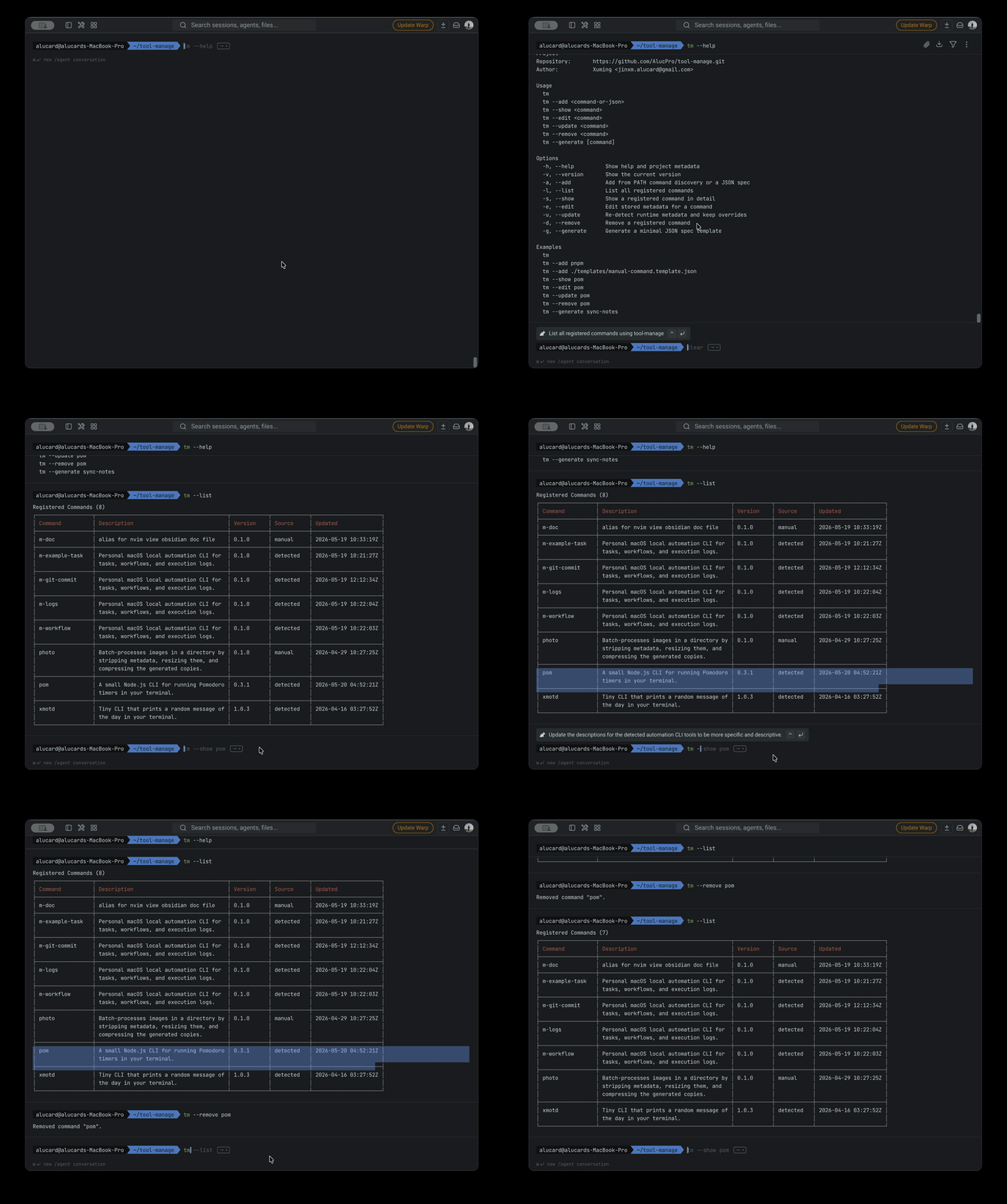
- Implement removal as soft deletion through `deleted_at`; an inactive command leaves the active list without losing its row, and adding it again restores the record.
- Keep the output readable by omitting empty fields and saving a help preview that can be inspected without rediscovering the original command context.
Current result
tool-manage is published as the MIT-licensed npm package `@alucpro/tool-manage` and exposes the `tm` executable for Node.js 18 or newer. The public repository contains the command implementation, SQLite schema reference, templates, bilingual README files, JSON specifications, and automated tests.
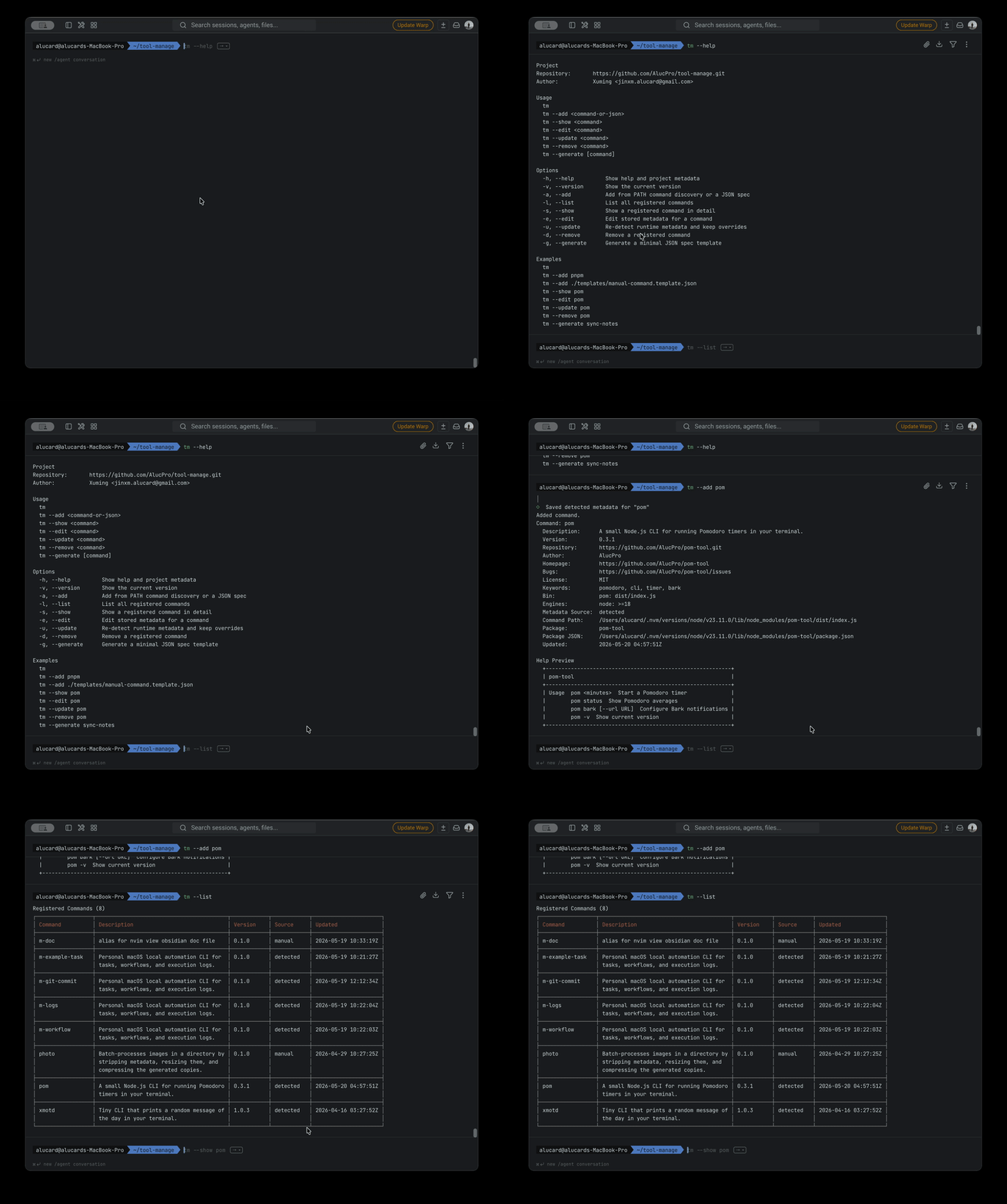
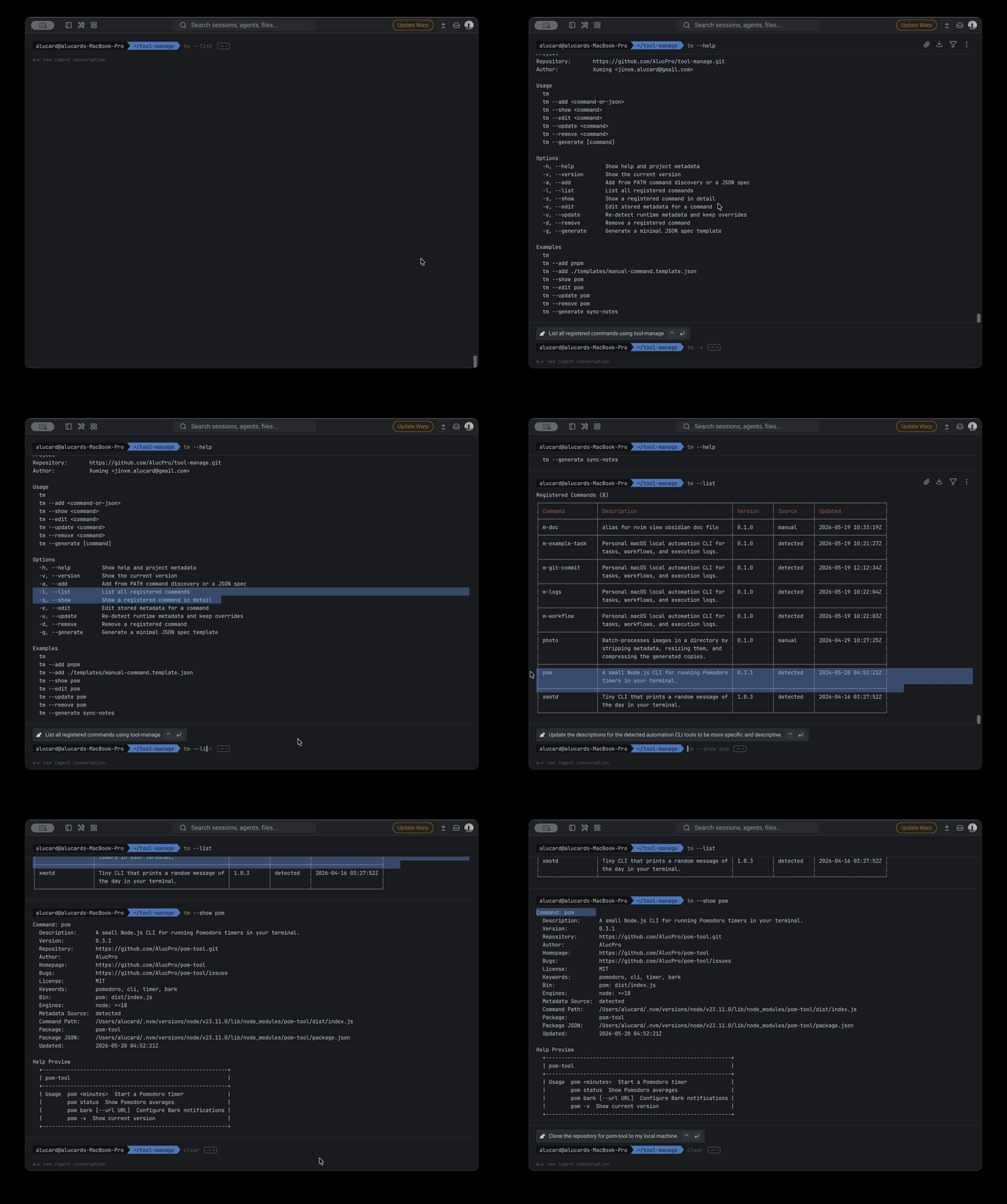
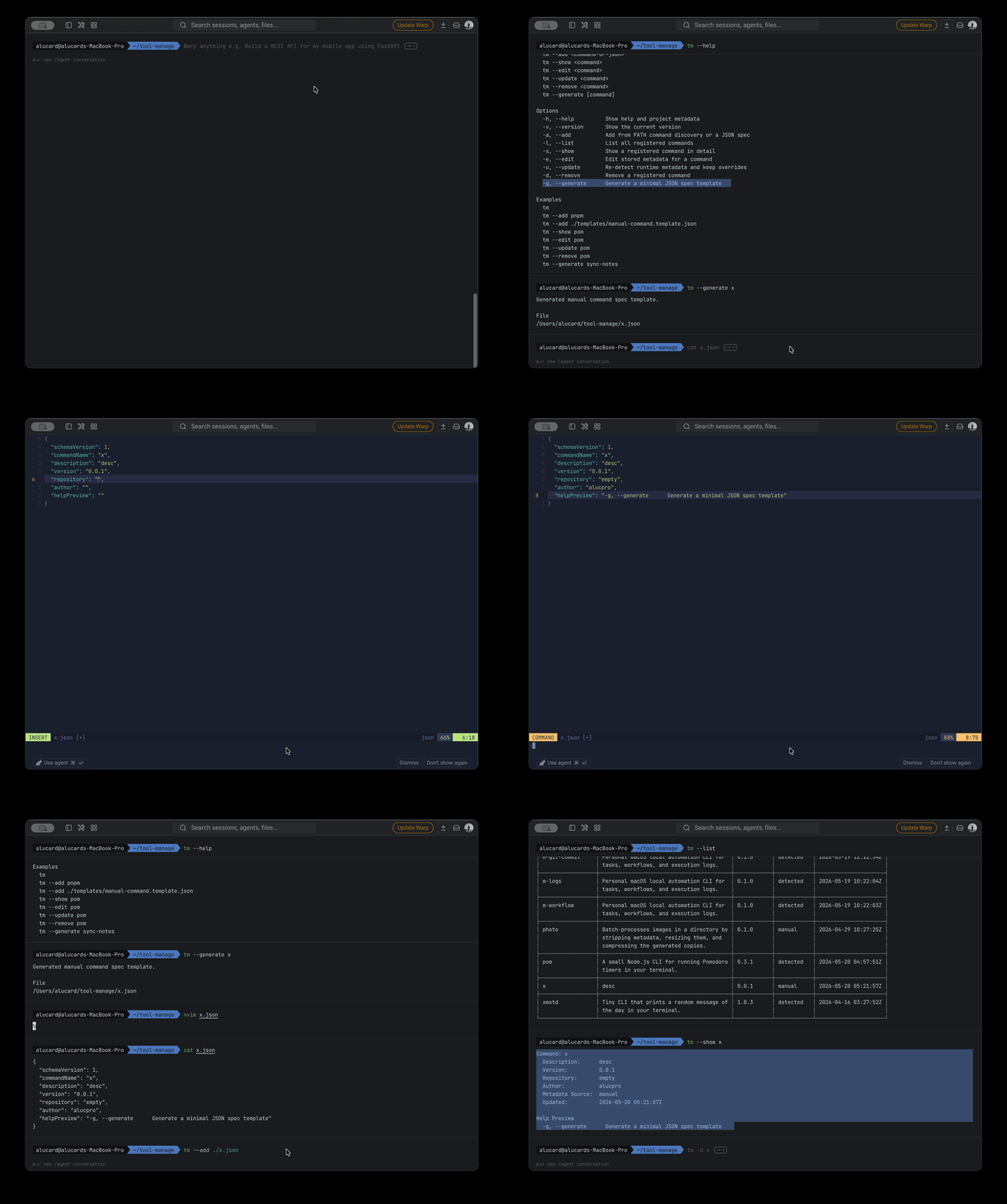
The released workflow can register a command discovered on the machine, list active records, show saved metadata and help, edit or refresh a record, generate a starter JSON description, import local or remote JSON, and archive a command. Runtime data stays in `~/.tool-manage`, with the registry stored in SQLite and editable templates kept beside it.
The current result is described through inspectable behavior rather than download or adoption claims. The package can be installed, the source and schema can be read, the tests verify core lifecycle behavior, and the terminal recordings show the actual command flow.
What this work clarified
Small developer tools become more useful when they name one neglected layer clearly. In this case, the missing layer was neither execution nor installation; it was durable context. Giving that layer a narrow product boundary prevented the project from growing into a task runner, version manager, or package manager.
Local-first storage also fits the subject. A catalog of private scripts and internal commands can contain paths, repositories, authors, and help text that should not require a remote account. SQLite provides enough structure for querying and migration while keeping ownership on the developer’s machine.
The project also reinforced that reversibility is part of maintenance. Soft deletion, metadata overrides, and explicit migrations make a personal registry more trustworthy because normal cleanup does not silently destroy useful history.
Working evidence
The real CLI workflow.
Four terminal recordings from the public repository: registering a command, inspecting its record, generating a manual spec, and retiring an old entry.
Open-source repository
Give a growing CLI toolbox a memory.
Read the implementation and documentation on GitHub, or install the published package to start a local registry.
View on GitHub